¶ DZ API
The general plugin, that allows you to change overall plugin configurations.
https://youtu.be/Vgi-9JDNtOw https://www.youtube.com/watch?v=WDknuIlmhuM
¶ DeadZone Config
The most important part of this is the delays, this sets the delay for every action in DeadZone
This helps to make you stand out and be unique from other people using DeadZone, it should match your playstyle
If you are unsure, you should use Mouse Recorder to figure out your personal delays
¶ Consume vs Direct Invokes
Consume is doing a click with your actual mouse, it might interfere if you're doing things like PvM, prayer flick, etc
Direct Invoke will do a kind of 'internal' click and won't interfere with the mouse
Auto will pick the best for the plugin
For skilling we recommend you just use consume since you usually just let it do its thing, but for PvM/PvP direct invoke is much better as you can carry out your own actions at the same time.
¶ Mouse Recorder
Mouse recorder will watch your gameplay and generate some delays that match your playstyle.
Simply toggle it on, and play something which is moderately click intensive and after 30+ interactions you should be able to click the toggle buttong again and it will print to game chat.
¶ Delay Profiles
To avoid detection, DeadZone applies a 'random' delay to each action that it performs.
We generate the random value based on a few parameters.
There's Min, Max, Target and Deviation.
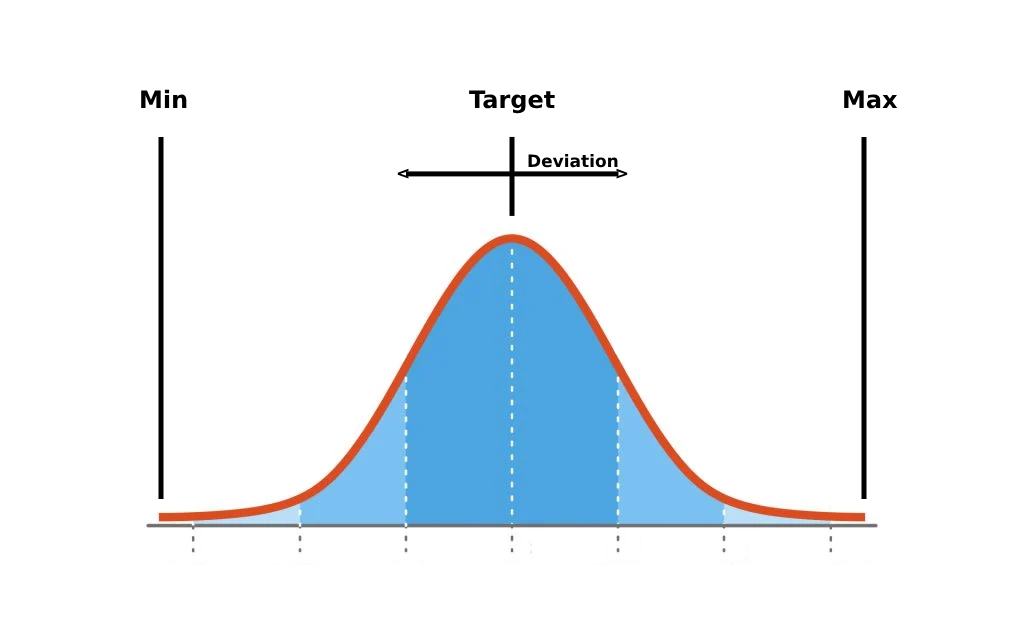
Min and Max are fairly obvious.
Target is where you will end up the majority of the time.
Deviation is how far you stray from the target. It determines how wide the dark blue section is.
NOTE: (target + deviation) should be LESS than max
NOTE: (target - deviation) should be MORE than min
Sometimes you will get delays that hit right up to the min or max. This gives a much more 'human like' delay.
- Q.) "You have not setup your DZ API delays correctly"
- A.) Make sure your target is inside of your min/max
¶ One Click Mode
With One-Click, a single of your mouse clicks carries out a single DZ action. This means for tasks such as Agility or Hunter you can use your real clicks, but DeadZone clicks the right objects, does the right interactions, etc. This is considerably safer as it uses your clicks!
¶ Skilling Breaks
Skilling breaks decides how often the plugin takes breaks, at different points in the process.
This should be relatively high, if doing highly risky things, such as agility.
¶ Item Dropper
Input the item IDs of the items you'd like to drop, the amount of items in your inventory before it starts dropping & the amount of time between each drop action.
¶ Auto Clicker
Set your toggle key and your delay range.
This will use your mouse position and click.
¶ Leagues
OSRS Leagues mode options are occasionally added to this when the gamemode is released.
¶ Web Walker
Web walker is used in a few plugins, that need to move around to different spots in the game. In here you can tick or untick different option to teleport around the game.
You can even use it to just walk around, open your map and click somewhere you'd like to go, and webwalker will take you there
Use Mouse recorder to make your clicks more in line with your average clicks
Make your DZ API custom if not using mouse recorder. Don't take some random API delays from someone on the discord. Put them low if doing high intensity PvM (somewhere between 30 min 120 max) higher if skilling
Use Click duration if doing skilling activities. It mimics how a human can sometimes hold the mouse for longer than just a single millisecond.
If you plan on using WW you should go set up how you'd like it to transport around